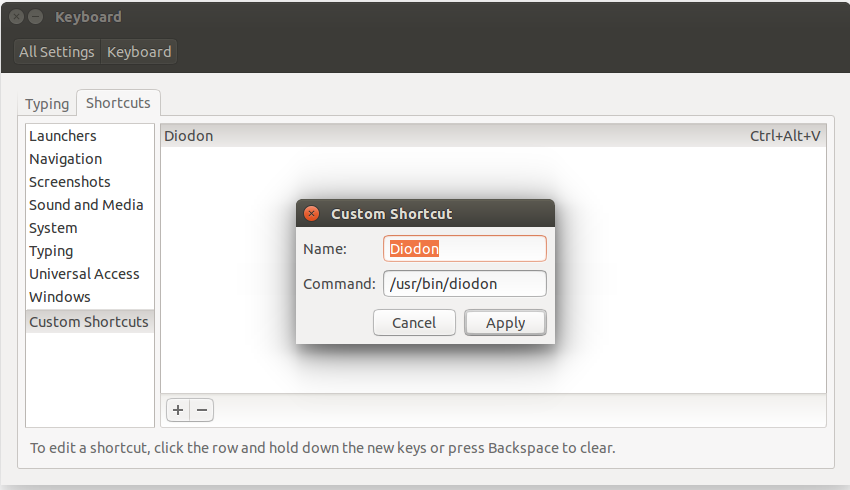
Diodon with instant paste for testing

The instant paste feature has finally landed into the Diodon trunk. With this feature there is now no need to press Ctrl+V after choosing a clipboard item (which you wanted to paste anyway ;) )
Diodon does this now for you…

However, before this change gets released it needs intensive testing. And, of course, I want to hear your comments on what you think.

Before you go ahead please remember that this code is in development state and therefore should not be used on a production system:

So let’s start with the installation by running following commands:
sudo add-apt-repository ppa:diodon-team/daily
sudo apt-get update
sudo apt-get install diodon

Close Diodon and open it again. The instant paste feature should now be activated. Set the cursor at the position you want to paste, choose an item from the clipboard history and see how it works (hopefully anyway ;) )

Note that currently the instant paste feature only works for applications which do not ignore events of X (see here for details) and use
Ctrl+V to paste content.

Please file a bug when you find an application where the instant paste does not work.

Posted in Projects | Tagged , | Leave a comment

New Diodon release and how to disable unity lens or indicator

After a testing phase of two weeks and fixing the rough edges a new release 0.4.0 of Diodon is now available in the stable ppa.

So if you want to get the new version with its new Unity Lens up and running, here are the commands to install it:
sudo add-apt-repository ppa:diodon-team/stable
sudo apt-get update
sudo apt-get install diodon

During the testing phase the question came up whether there is a way to disable the Unity Lens and/or indicator?
Firstly, I have to say currently there is no easy way to disable such. In the future, a plugin system is planned where each feature such as the indicator or unity lens can be installed independently. However for now there is a workaround.

If you want to disable the Unity Lens you can simply remove the file diodon.place with the following command:
sudo rm /usr/share/unity/places/diodon.place

Logout and login again and the Unity Lens should have disappeared. Note when a new version of diodon is installed, you might have to redo this step.

There is also a way to disable the Diodon indicator by changing the gconf setting /apps/diodon/show_indicator:

  • Press Alt+F2
  • run gconf-editor
  • browse to /apps/diodon
  • disable show_indicator

The indicator should disappear straight away.
If desired you can even disable indicator and unity lens. Diodon can than still be used with the hotkey Ctrl+Alt+V.

Posted in Projects | Tagged , | Leave a comment

Call for testing: Unity lens for Diodon

The diodon unity lens has made it into the trunk and therefore is now available in the daily ppa. Before it will be released it needs intensive testing. So go for it and grab it.

But before you start here are some instructions. Please remember that this code is in development state and therefore should not be used on a production system:

So let’s start with the installation by running following commands:
sudo add-apt-repository ppa:diodon-team/daily
sudo apt-get update
sudo apt-get install diodon

After diodon is installed you have to logout from unity and login again. Now the Diodon Unity Lens should appear in the Launcher. Either use the mouse or press <Super>-v to show the dash for diodon.

That should be all you need to know. Oh wait, when you want to build from source, note that the Unity Lens is not built by default but needs to be enabled during compilation. Use following commands to do so:
bzr branch lp:diodon
cd diodon
./waf configure --enable-unity-lens
./waf build
sudo ./waf install
diodon

Looking forward to read your comments on what you think of the Diodon Unity Lens.

Posted in Projects | Tagged , , | Leave a comment

After updating to Natty: Why has Diodon stopped working?

The question has been raised why Diodon is not running anymore after updating from  Maverick to Natty. If you have encountered the same problem I hope the following explanation will clear it up.

So in Maverick Diodon is linked against several libraries such as libdbusmenu-glib.so.1. This library has been updated in Natty and is there available as libdbusmenu-glib.so.3. This is actually not a problem as there are different debian packages available for Maverick and Natty which link to the different libraries.

However a problem can be raised when updating from Maverick to Natty. During the update process Ubuntu disables all 3rd party apt installation sources including the Diodon ppa. So the system will get updated but the correct Diodon version for Natty won’t be installed. This means the old Diodon Maverick binary, which is linked against libdbusmenu-glib.so.1, is still on the system. As this library is not available on Natty, however, it can not be started anymore.

To get around this, the Natty Diodon ppa needs to be configured and the Natty Diodon version installed. This can be done with the following commands:
sudo add-apt-repository ppa:diodon-team/stable
sudo apt-get update
sudo apt-get install diodon

So this way Diodon should be up and running again.

Posted in Projects | Tagged , | 1 Comment

Diodon available for Lucid

As Diodon has some dependencies not available per default in Lucid there was so far no package for it. However as Lucid is a LTS version and some user would still like to use Diodon on their machine I have some great news from you ;) :

After some dependency fiddling and adjusting code a new Diodon version 0.3.1 is available which can now be built on Lucid as well (Note: ppa:sao/backports is needed however).

Find a package in the official Diodon ppa.

Posted in Projects | Tagged , | Leave a comment

Diodon: Looking for a designer

You might have heard about the Diodon project, a new clipboard manager for GNOME./Unity. No? If not so find more about it on the Lauchpad Project side.

Diodon is a project aiming to integrate well into the GNOME and Unity desktop thereby having a small footprint.

Currently Diodon uses a application indicator to access the clipboard history. However, plans are to replace this with a more accessible dialog with filtering ability.

Although such plans will integrate Diodon better into the desktop there is no way around for a better look and feel but having the right icons maybe even wallpapers etc… Hence, we are looking for a designer who can help us out in this area.

Interested? Please contact us over irc, mail or whatever way you prefer (see here). Your help would be very much appreciated.

Posted in Projects | Tagged | Leave a comment

A new age

The frequency of posts has been pretty low in the last few months. However, there are many exciting things going on around esite.ch so I hope to get around more often to leave one or another message here.

To accomplish this it is important to me that this blog gains more focus. Therefore I have decided to change a couple of things. Firstly, you propperly already noticed, I have changed the new look and feel to the new wordpress theme ;) . Secondly have I moved the blog to esite.ch. blog.esite.ch is still available but just redirects to esite.ch.

To reach a wider audience all future posts will be in English. However, all old posts will remain in German.

So I hope you like the changes and will see you around ;) .

Posted in General | Leave a comment

Global hotkeys with vala

The issue

Whilst working on Diodon I needed to implement a global hotkey. After browsing the web and some source code I came up with the following solution.

Get the code

Here is a sample class to easily bind a delegate with a global hotkey.

/**
 * This class is in charge to grab keybindings on the X11 display
 * and filter X11-events and passing on such events to the registed
 * handler methods.
 *
 * @author Oliver Sauder
 */
public class KeybindingManager : GLib.Object
{
    /**
     * list of binded keybindings
     */
    private Gee.List bindings = new Gee.ArrayList();

    /**
     * locked modifiers used to grab all keys whatever lock key
     * is pressed.
     */
    private static uint[] lock_modifiers = {
        0,
        Gdk.ModifierType.MOD2_MASK, // NUM_LOCK
        Gdk.ModifierType.LOCK_MASK, // CAPS_LOCK
        Gdk.ModifierType.MOD5_MASK, // SCROLL_LOCK
        Gdk.ModifierType.MOD2_MASK|Gdk.ModifierType.LOCK_MASK,
        Gdk.ModifierType.MOD2_MASK|Gdk.ModifierType.MOD5_MASK,
        Gdk.ModifierType.LOCK_MASK|Gdk.ModifierType.MOD5_MASK,
        Gdk.ModifierType.MOD2_MASK|Gdk.ModifierType.LOCK_MASK|Gdk.ModifierType.MOD5_MASK
    };

    /**
     * Helper class to store keybinding
     */
    private class Keybinding
    {
        public Keybinding(string accelerator, int keycode,
            Gdk.ModifierType modifiers, KeybindingHandlerFunc handler)
        {
            this.accelerator = accelerator;
            this.keycode = keycode;
            this.modifiers = modifiers;
            this.handler = handler;
        }

        public string accelerator { get; set; }
        public int keycode { get; set; }
        public Gdk.ModifierType modifiers { get; set; }
        public KeybindingHandlerFunc handler { get; set; }
    }

    /**
     * Keybinding func needed to bind key to handler
     *
     * @param event passing on gdk event
     */
    public delegate void KeybindingHandlerFunc(Gdk.Event event);

    public KeybindingManager()
    {
        // init filter to retrieve X.Events
        Gdk.Window rootwin = Gdk.get_default_root_window();
        if(rootwin != null) {
            rootwin.add_filter(event_filter);
        }
    }

    /**
     * Bind accelerator to given handler
     *
     * @param accelerator accelerator parsable by Gtk.accelerator_parse
     * @param handler handler called when given accelerator is pressed
     */
    public void bind(string accelerator, KeybindingHandlerFunc handler)
    {
        debug("Binding key " + accelerator);

        // convert accelerator
        uint keysym;
        Gdk.ModifierType modifiers;
        Gtk.accelerator_parse(accelerator, out keysym, out modifiers);

        Gdk.Window rootwin = Gdk.get_default_root_window();
        X.Display display = Gdk.x11_drawable_get_xdisplay(rootwin);
        X.ID xid = Gdk.x11_drawable_get_xid(rootwin);
        int keycode = display.keysym_to_keycode(keysym);            

        if(keycode != 0) {
            // trap XErrors to avoid closing of application
            // even when grabing of key fails
            Gdk.error_trap_push();

            // grab key finally
            // also grab all keys which are combined with a lock key such NumLock
            foreach(uint lock_modifier in lock_modifiers) {
                display.grab_key(keycode, modifiers|lock_modifier, xid, false,
                    X.GrabMode.Async, X.GrabMode.Async);
            }

            // wait until all X request have been processed
            Gdk.flush();

            // store binding
            Keybinding binding = new Keybinding(accelerator, keycode, modifiers, handler);
            bindings.add(binding);

            debug("Successfully binded key " + accelerator);
        }
    }

    /**
     * Unbind given accelerator.
     *
     * @param accelerator accelerator parsable by Gtk.accelerator_parse
     */
    public void unbind(string accelerator)
    {
        debug("Unbinding key " + accelerator);

        Gdk.Window rootwin = Gdk.get_default_root_window();
        X.Display display = Gdk.x11_drawable_get_xdisplay(rootwin);
        X.ID xid = Gdk.x11_drawable_get_xid(rootwin);

        // unbind all keys with given accelerator
        Gee.List remove_bindings = new Gee.ArrayList();
        foreach(Keybinding binding in bindings) {
            if(str_equal(accelerator, binding.accelerator)) {
                foreach(uint lock_modifier in lock_modifiers) {
                    display.ungrab_key(binding.keycode, binding.modifiers, xid);
                }
                remove_bindings.add(binding);
            }
        }

        // remove unbinded keys
        bindings.remove_all(remove_bindings);
    }

    /**
     * Event filter method needed to fetch X.Events
     */
    public Gdk.FilterReturn event_filter(Gdk.XEvent gdk_xevent, Gdk.Event gdk_event)
    {
        Gdk.FilterReturn filter_return = Gdk.FilterReturn.CONTINUE;

        void* pointer = &gdk_xevent;
        X.Event* xevent = (X.Event*) pointer;

         if(xevent->type == X.EventType.KeyPress) {
            foreach(Keybinding binding in bindings) {
                // remove NumLock, CapsLock and ScrollLock from key state
                uint event_mods = xevent.xkey.state & ~ (lock_modifiers[7]);
                if(xevent->xkey.keycode == binding.keycode && event_mods == binding.modifiers) {
                    // call all handlers with pressed key and modifiers
                    binding.handler(gdk_event);
                }
            }
         }

        return filter_return;
    }
}

How to use it

As some bindings needed to be adjusted you need at least version 0.11.3 of vala.

Furthermore are following packages needed:

  • gtk+-2.0
  • x11
  • gdk-x11-2.0
  • gee-1.0

Here is a sample how to compile this class:

valac --pkg gtk+-2.0 --pkg x11 --pkg gdk-x11-2.0 --pkg gee-1.0 keybinding-manager.vala

So and finally here some sample code how to bind a key:

public static int main (string[] args)
{
    Gtk.init (ref args);

    KeybindingManager manager = new KeybindingManager();
    manager.bind("V", test);

    Gtk.main ();
    return 0;
}

private static void test()
{
    debug("hotkey pressed");
}

Hope this sample class will be helpful for you. Happy coding ;) .

Posted in Knowledge base | Tagged , | 3 Comments

Easen use of svn switch with bash prompt

The issue

svn switch can safe a lot of time when working in different branches as not all source code has to be checked out again.
But well you know it: How fast does it happen that a file gets committed in the wrong branch?
To prevent you from always have to call svn info before committing, here comes the script which includes the current branch in the bash prompt so you may never commit code in the wrong branch again ;) .

Get the script

#!/usr/bin/perl
use Cwd;
my $dir = getcwd;
unless( -r $dir."/.svn" )
{
  exit;
}
$ret="svn";
$dir=`svn info | grep URL`;
$dir =~ s/n//;
if($dir =~ m//trunk/)
{
  $ret="trunk";
}
if($dir =~ m/branches/|tags//)
{
  $dir=$dir."/";
  $dir =~ s/.*(b|t)(ranches|ags)/(.*?)/.*/$1:$3/;
  $ret=$dir;
}
print " [$ret]";

What needs to be installed

Subversion of course and perl to run the script, which is usually installed in most distributions.

How to use it

Let’s store the script to svn-ps1.pl somewhere let’s say $HOME/bin.
Now open the bashrc file with vi ~/.bashrc and adjust the export of the PS1 variable:
PS1='${debian_chroot:+($debian_chroot)}[33[01;32m]u@h[33[00m]:[33[01;34m]w[33[00m]$ '
to the following:
PS1='${debian_chroot:+($debian_chroot)}[33[01;32m]u@h[33[00m]:[33[01;34m]w[33[00m]$(~/bin/svn-ps1.pl)$ '

Now simply change to some source code checked out with subversion and you will see that the prompt will look like this:
user@laptop:~/src/svn/some-code [b:branch-name]$

Cheers!

Posted in Knowledge base | Tagged , , , | Leave a comment

PPA für Backports

Es kommt doch noch häufiger vor als einem lieb ist, das man eine neue Version einer Library oder Applikation benötigt, die erst im Ubuntu Entwicklungszweig vorhanden sind, aber nicht in der aktuellen Version.
Von solchen Versionen mache ich dann oft doch noch einen Backport um diese auf meinem System zu testen. Um diese Backports auch der Öffentlichkeit zu Verfügung zu stellen, habe ich ein Backport PPA eröffnet. Von Zeit zu Zeit füge ich diesem PPA Backports aus verschiedenen Bereichen hinzu. Was alle Backports aber gleich haben, ist, dass diese aus einem offiziellen Ubuntu Repository erstellt wurden und daher weniger Probleme verursachen sollte.
Aber Gewähr dafür kann ich natürlich nicht geben.

Um Pakete aus dem Backport Repositroy zu installieren, muss folgender Befehl ausgeführt werden:
sudo add-apt-repository ppa:sao/backports

Jetzt fehlt nur noch eine apt-get update und es kann los gehen ;) .

Posted in Projects | Tagged | Leave a comment